
Overview
The Agent Tasks API allows you to programmatically create and monitor background agent tasks that modify your Flint sites.
Base URL
https://app.tryflint.com/api/v1Authentication
All requests require authentication via API key. Include your API key in the Authorization header:
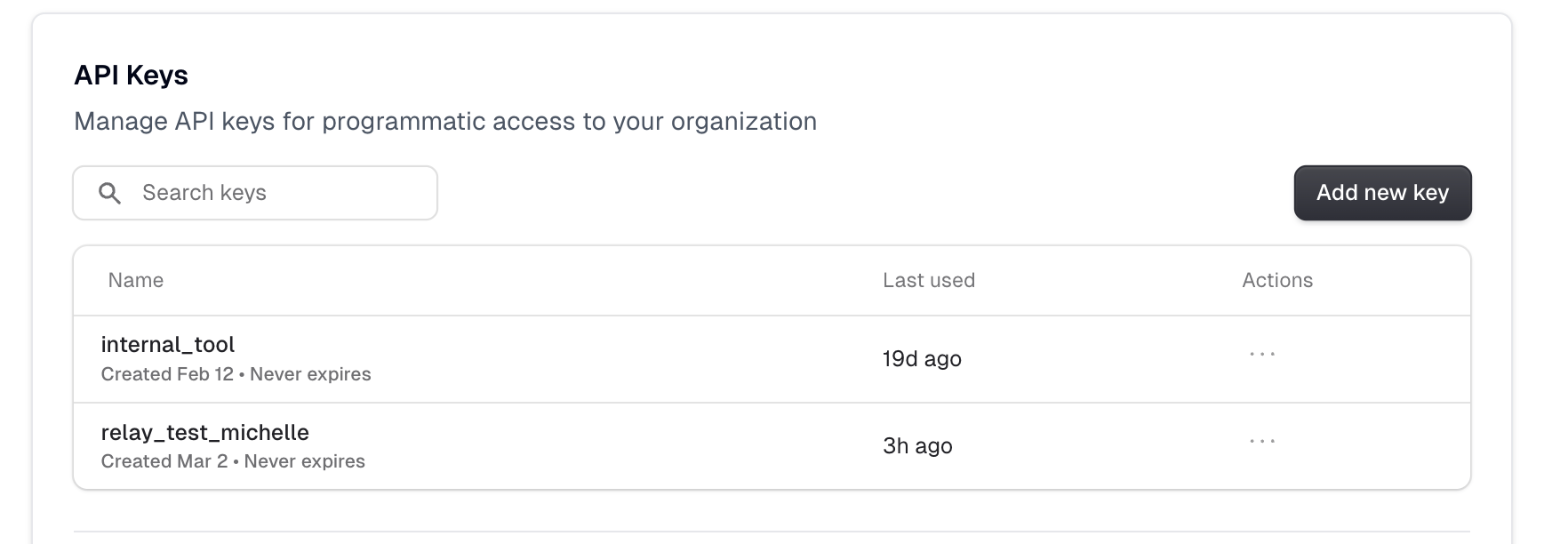
Authorization: Bearer ak_your_api_key_hereAPI keys can be created in your Flint team settings. Keys are scoped to your organization and require at least member role permissions.
Rate Limiting
These endpoints are rate limited. If you exceed the limit, you'll receive a 429 Too Many Requests response.
POST Create a Task
Start a new background agent task to modify a site.
POST /agent/tasksThis endpoint accepts two types of tasks. Choose the one that fits your use case.
Task Type 1: Prompt
Send the AI free-form instructions in plain language. The agent reads your site and carries out the changes.
| Field | Type | Required | Description |
|---|---|---|---|
siteId | string | Yes | UUID of the site to modify |
prompt | string | Yes | What you want the AI to do, in plain English |
command | string | No | Set to prompt or omit entirely - this is the default |
callbackUrl | string | No | HTTPS URL to receive a POST when the task completes |
Example Request (Prompt)
curl -X POST https://app.tryflint.com/api/v1/agent/tasks \
  -H "Authorization: Bearer ak_your_api_key_here" \
  -H "Content-Type: application/json" \
  -d '{
    "siteId": "550e8400-e29b-41d4-a716-446655440000",
    "prompt": "Add a new About page with a team section",
    "callbackUrl": "https://your-server.com/webhooks/flint"
  }'
---
Task Type 2: Generate Pages
Create multiple pages at scale by providing a template and a list of items. Each item gets its own page generated from that template using the context you provide. Useful for case studies, landing pages, location pages, and similar repeatable content.
| Field | Type | Required | Description |
|---|---|---|---|
siteId | string | Yes | UUID of the site to modify |
command | string | Yes | Must be generate_pages |
templatePageSlug | string | Yes | The path of any existing page on your Flint site to use as the design template (e.g. /case-studies/template). Flint will use this page's layout and design to generate each new page. |
items | array | Yes | 1-10 items to generate. Each item has: targetPageSlug (required, the path for the new page) and context (required, the content or data for this specific page) |
callbackUrl | string | No | HTTPS URL to receive a POST when the task completes |
Example Request (Generate Pages)
curl -X POST https://app.tryflint.com/api/v1/agent/tasks \
  -H "Authorization: Bearer ak_your_api_key_here" \
  -H "Content-Type: application/json" \
  -d '{
    "siteId": "550e8400-e29b-41d4-a716-446655440000",
    "command": "generate_pages",
    "templatePageSlug": "/case-studies/template",
    "items": [
      {
        "targetPageSlug": "/case-studies/acme-corp",
        "context": "Company: Acme Corp. Industry: Manufacturing. Challenge: Needed to reduce production downtime. Solution: Implemented our monitoring system. Results: 40% reduction in downtime, $2M annual savings."
      },
      {
        "targetPageSlug": "/case-studies/globex",
        "context": "Company: Globex Inc. Industry: Finance. Challenge: Manual compliance reporting taking weeks. Solution: Automated reporting pipeline. Results: Reports generated in hours, 99.9% accuracy."
      }
    ],
    "callbackUrl": "https://your-server.com/webhooks/flint"
  }'
---
Success Response (200)
{
  "taskId": "bg-550e8400-e29b-41d4-a716-446655440000-a1b2c3d4",
  "status": "running",
  "createdAt": "2026-03-11T12:00:00.000Z"
}
Error Responses
| Status | Response |
|---|---|
| 400 | { "error": "Site is missing repository information" } |
| 400 | { "error": "Invalid callback URL" } |
| 404 | { "error": "Site not found" } |
| 500 | { "error": "Failed to start task" } |
GET Get Task Status
Retrieve the current status and results of a task.
GET /agent/tasks/{taskId}Path Parameters
| Parameter | Type | Description |
|---|---|---|
taskId | string | The task ID from creation |
Example Request
curl https://app.tryflint.com/api/v1/agent/tasks/bg-550e8400-a1b2c3d4 \
  -H "Authorization: Bearer ak_your_api_key_here"
Response Formats
The response varies based on task status:
In Progress
{
  "taskId": "bg-550e8400-a1b2c3d4",
  "status": "running"
}
Completed
{
  "taskId": "bg-550e8400-a1b2c3d4",
  "status": "completed",
  "output": {
    "pagesCreated": [
      {
        "slug": "/about",
        "previewUrl": "https://your-site-abc123.vercel.app/about",
        "editUrl": "https://app.tryflint.com/app/edit?siteId=...&page=about"
      }
    ],
    "pagesModified": [],
    "pagesDeleted": []
  }
}
Failed
{
  "taskId": "bg-550e8400-a1b2c3d4",
  "status": "failed",
  "errorMessage": "Failed to generate page content"
}
Not Found (404)
{
  "error": "Task not found"
}
Output Fields
When a task completes successfully, the output object contains:
| Field | Type | Description |
|---|---|---|
pagesCreated | array | Pages that were newly created |
pagesModified | array | Existing pages that were updated |
pagesDeleted | array | Pages that were removed |
Each page object contains:
| Field | Type | Description |
|---|---|---|
slug | string | The page path (e.g., /about) |
previewUrl | string/null | URL to preview the page on the deployment |
editUrl | string/null | URL to edit the page in the Flint editor |
Polling for Completion
Tasks run asynchronously. Poll the GET endpoint to check for completion:
async function waitForTask(taskId, apiKey) {
  const maxAttempts = 60;
  const delayMs = 5000;

  for (let i = 0; i < maxAttempts; i++) {
    const response = await fetch(
      `https://app.tryflint.com/api/v1/agent/tasks/${taskId}`,
      { headers: { Authorization: `Bearer ${apiKey}` } }
    );
    const data = await response.json();

    if (data.status === "completed" || data.status === "failed") {
      return data;
    }

    await new Promise((resolve) => setTimeout(resolve, delayMs));
  }

  throw new Error("Task timed out");
}
Callback URLs
Instead of polling, you can provide a callbackUrl when creating a task. When the task completes (success or failure), Flint will POST a JSON payload to that URL.
Requirements
- •Must use HTTPS
- •Internal/private IP addresses and localhost are blocked for security
- •If validation fails, the API returns a 400 error
Success Payload
{
  "taskId": "bg-550e8400-a1b2c3d4",
  "status": "succeeded",
  "pages": [
    { "slug": "/about", "previewUrl": "https://your-site-abc123.vercel.app/about", "editUrl": "https://app.tryflint.com/app/edit?siteId=...&page=about" }
  ],
  "timestamp": "2026-03-11T12:00:00.000Z"
}
Failure Payload
{
  "taskId": "bg-550e8400-a1b2c3d4",
  "status": "failed",
  "error": "Failed to generate page content",
  "timestamp": "2026-03-11T12:00:00.000Z"
}
Payload Fields
| Field | Type | Present | Description |
|---|---|---|---|
taskId | string | Always | The task ID matching the one returned at creation |
status | string | Always | Either succeeded or failed |
pages | array | Success only | Array of pages with slug, previewUrl, and editUrl |
error | string | Failure only | Description of what went wrong |
timestamp | string | Always | ISO 8601 timestamp of completion |
Retry Behavior
Flint retries up to 3 times with exponential backoff (starting at 5 seconds) if your server returns a non-2xx response or times out.
Example Webhook Handler (Node.js)
app.post('/webhooks/flint', (req, res) => {
  const { taskId, status, pages, error } = req.body;
  if (status === 'succeeded') {
    console.log(`Task ${taskId} completed. Pages:`, pages);
  } else {
    console.error(`Task ${taskId} failed:`, error);
  }
  res.sendStatus(200);
});